Marriage Biodata in Word Format: Free .docx Download
Many people want their biodata as a Word file so they can make small changes later. Fill in the form on BanglaBiodata and download a Word (.docx) file in one click, along with a pixel-perfect PDF.
No login to start. Replace the sample details with your own; PDF download is free.
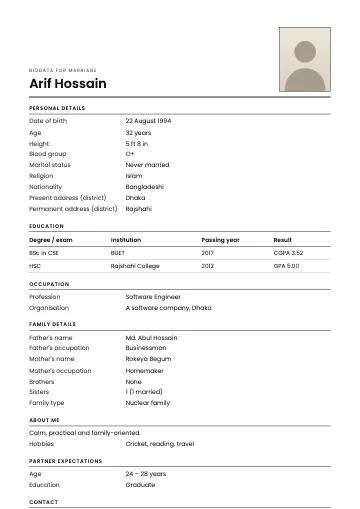
Biodatas in Bangladesh have been typed in Word for a long time: at the computer shop, on an office PC, or by filling your details into a relative's old file. The trouble is that old files often use old fonts, Bangla breaks on another computer, and lining up the tables takes ages. Here it works the other way round: you fill in a simple form, and a tidy Word file is built for you, along with a designed PDF.
Why a Word file?
- Edit it yourself later. A new job, address or photo? Open the file and update it.
- Matchmakers and relatives ask for it. Many keep biodatas in Word.
- Easy at a print shop. Shop computers open Word files without fuss.
The real advantage of Word is freedom. Fixing a spelling mistake, adding one line for a particular family or putting in a new phone number doesn't mean rebuilding the whole biodata. In many families one person makes the biodata and another checks it later; a Word file works for both.
How to get the Word file
- Open the free biodata maker and choose a template and language.
- Fill in the form step by step. Writing in Bangla? Type in English letters (ami → আমি).
- In the last step choose Word (.docx). The file downloads to your phone or computer.
What's in the Word file
Everything you filled in, in the same order:
- Heading and name at the top, with Bismillah or Shree Shree if you chose a religious heading.
- Your photo, if you added one. In Word you can drag it to resize.
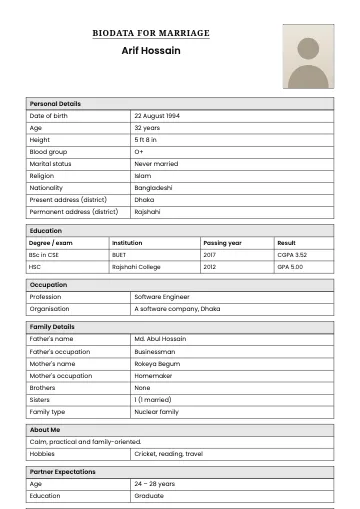
- Each section under its own heading: personal details, education, occupation, family, about me, expectations, contact.
- Details in a two-column table: the field name on the left, your answer on the right. Change any cell or add a row.
- Your own extra fields, added with "Add more information".
Fields you left empty don't appear in the Word file either, so there's nothing to delete.
Tips for editing in Word
- Font: keep Bangla text in Nirmala UI or Noto Sans Bengali. On a Mac, Kohinoor Bangla works too.
- Size: 11 or 12 point. Smaller text is hard to read when printed.
- Running onto a second page? Shorten long hobby or expectation paragraphs, or narrow the margins (Layout → Margins → Narrow).
- Photo jumping around? Click it, open Layout Options and choose "In Line with Text".
- Send a PDF of the result: File → Save As → PDF, so it looks the same on every phone.
Word or PDF: which when
- Sending and printing, with the design: PDF
- Editing yourself later: Word (.docx)
- Sharing on WhatsApp or Messenger: image (JPG)
In a PDF, Bangla conjuncts stay correct on every device because the font travels inside the file. A Word file uses whatever fonts the opening computer has. So make your final copy a PDF before sending it.
Common problems
- Boxes instead of Bangla letters: that device has no Bangla font. Send a PDF there instead of a Word file.
- Border cut off when printing: print on A4 at 100% ("Actual size"), not "Fit to page".
- File won't open on the phone: long-press it in Downloads, choose "Open with" and pick Word or Docs.
Edit in Word, keep the original online
Big changes, like a new job or a new photo, are easiest in the maker: update the field and download a fresh PDF and Word file. Small one-off changes, like a line for one particular family, are quicker in Word. If you sign in, your biodata stays in your account and opens on any phone, so the original is never lost.
Want a form to fill by hand?
To print a blank form and write on it, see blank biodata form PDF.
Updated:
Frequently asked questions
- Will Bangla text display correctly in Word?
- Yes, on a computer with a Bangla font (Nirmala UI comes with Windows; SolaimanLipi or Kalpurush also work). On phones or computers without one, conjuncts may break, so a PDF is safest for sending.
- Can I open the Word file in Google Docs?
- Yes. Upload it to Google Drive and open it with Google Docs.
- Is the Word download free?
- Yes. PDF, image and Word downloads are all free.
- Does the Word file keep the template design?
- The Word file is a clean, editable table layout. For the designed final copy, download the PDF.
- Does the Word file keep the template design?
- No. The Word file has a clean, editable layout: a heading, your photo and your details in tables. For the designed version, download the PDF or image.
- Bangla looks broken in Word. What do I do?
- Select the text and set the font to Nirmala UI (it comes with Windows) or Noto Sans Bengali. Avoid older fonts such as SutonnyMJ, which break on other computers.
- Can I open the Word file on my phone?
- Yes, in Microsoft Word, Google Docs or WPS Office. All are free and fine for small edits.
Templates that suit this article
Read next
- Biodata for Marriage for a Girl: Format and Full Sample
How to write a girl's (bride's) marriage biodata in Bangladesh: the right format, a complete sample, and advice on photos and privacy. Start from the sample for free.
- Bengali Biodata Format: Bangla Marriage Biodata, Free PDF and Word
Bengali (Bangla) biodata format for marriage: the sections, the order Bangladeshi families expect, a sample, and free PDF and Word downloads in 100+ templates.